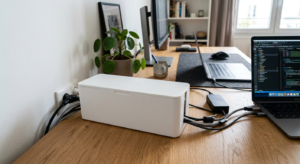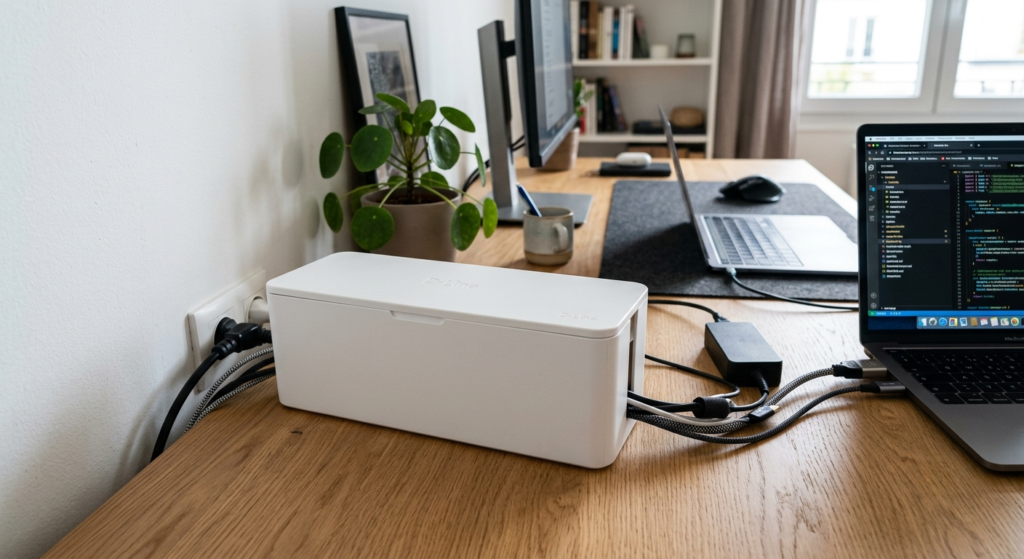
Looking for the best cable boxes for your home office? A cable box is the simplest way to hide the tangle of cords, power strips, and surge protectors under your desk. Instead of staring at a mess of black cables every time you sit down to work, you tuck everything into one vented box that keeps it out of sight and, in the better models, safely ventilated. We read through cable boxes reviews and compared the top cable boxes for 2026 on capacity, cable entry points, ventilation, and how well they blend into a home office instead of looking like a plastic tub under the desk. Our top pick balances size and airflow, but a few other options below might fit your setup better depending on how many cables and power strips you’re routing.
Quick Comparison: The Best Cable Boxes at a Glance
Prices shown in CAD, pulled from live Amazon listings — click through for current pricing.
| Product | Rating | Price | Best For | |
|---|---|---|---|---|
| D-Line Cable Management Box (Large) | 4.5★ (6,415) | CAD 39.34 | Best Overall | Check Price → |
| Baskiss Cable Management Box, Wood Lid | 4.4★ (5,589) | CAD 19.66 | Best Compact | Check Price → |
| ZhiYo Cable Management Box 2-Pack (M + XL) | 4.5★ (1,296) | CAD 28.10 | Best Value | Check Price → |
| YECAYE 2-Pack Cable Management Box | 4.6★ (4,375) | CAD 33.72 | Best for Multiple Power Strips | Check Price → |
| Tamfile Fireproof Cable Management Box | 4.6★ (33) | CAD 32.03 | Best Fire-Resistant Design | Check Price → |
| Naeety 2-Pack Wooden-Style Cable Box | 4.4★ (3,706) | CAD 36.53 | Best Premium / Design Pick | Check Price → |
Our Top Picks
1. D-Line Cable Management Box (Large) — Best Overall
The D-Line is the most-reviewed cable box on Amazon by a wide margin, and the rating holds up at scale. It’s a simple white or black ABS box (16.5″ x 6.5″ x 5.25″) with three rear cable slots and curved edges that keep it from looking like a plain storage bin. Made in the UK from electrically safe ABS plastic.
| ✅ Pros | ❌ Cons |
|---|---|
| 6,400+ ratings at 4.5 stars — the largest track record in this list | No mesh vents — airflow relies on the rear slots only |
| Sturdy ABS construction that holds its shape under a power strip’s weight | White or black only, no wood or fabric finish |
| Curved, low-profile design blends into most rooms |
Best for: anyone who wants the most proven option on the market and doesn’t need a decorative finish.
2. Baskiss Cable Management Box, Wood Lid — Best Compact
At 12″ x 5″ x 4.5″, the Baskiss is one of the smaller boxes on this list, built for standard-size power strips rather than large surge protectors. The wood-style lid doubles as a small tray for a phone or remote, and it’s the cheapest option here.
| ✅ Pros | ❌ Cons |
|---|---|
| Compact footprint fits tight desk corners | Only fits power strips under 11.4″ x 4.1″ — measure yours first |
| Wood-style lid looks better than plain plastic and doubles as a tray | Body is plastic despite the wood-look lid |
| Lowest price in this list |
Best for: smaller desks or standard-size power strips where a large box would be overkill.
3. ZhiYo Cable Management Box 2-Pack (M + XL) — Best Value
This pack includes an XL box (fits power strips up to 13.4″) and a medium box (up to 11″) for the price of roughly one premium box elsewhere. It carries an Amazon’s Choice badge and a solid 4.5-star rating.
| ✅ Pros | ❌ Cons |
|---|---|
| Two sizes covers a desk box and a floor box in one order | Fewer total ratings than the D-Line — a newer listing |
| Amazon’s Choice with a strong 4.5-star average | Black only in this bundle |
| Good price per box compared to buying two separately |
Best for: anyone who needs to box up two separate power strips — for example, one at the desk and one on the floor — without buying twice.
4. YECAYE 2-Pack Cable Management Box — Best for Multiple Power Strips
The YECAYE 2-pack has the highest rating of any multi-box set here, with a child- and pet-proof latch design on both boxes. It’s a good fit for setups with more than one cable cluster, like a router plus a separate desk power strip.
| ✅ Pros | ❌ Cons |
|---|---|
| 4.6-star average across 4,000+ ratings | White only in this listing (a black version is sold separately) |
| Child- and pet-proof latch on both boxes | More box than you need if you only have one power strip |
| Two boxes cover two separate cable clusters |
Best for: home offices with more than one cable cluster to hide, like a router and a monitor power strip in different spots.
5. Tamfile Fireproof Cable Management Box — Best Fire-Resistant Design
The Tamfile is the only box on this list with third-party flammability testing: a multi-layer silicone-coated fiberglass shell that passes the UL-94 VTM-0 flammability test, plus ventilation holes at both ends for heat dissipation. It’s a newer listing, so the rating is based on a small sample so far.
| ✅ Pros | ❌ Cons |
|---|---|
| UL-94 VTM-0 flammability test passed — the only pick here with third-party fire testing | Only 33 ratings so far — a newer, less-proven listing |
| Dedicated ventilation holes for heat dissipation | Priced above the D-Line for a smaller box |
| Foldable for flat storage when not in use |
Best for: anyone prioritizing fire safety over price or looks — for example, boxing in a power strip feeding a space heater or other high-draw devices.
6. Naeety 2-Pack Wooden-Style Cable Box — Best Premium / Design Pick
This set pairs a large and medium box, both with a wood-style finish, plus bonus cable ties, stick-on clips, and a fabric sleeve. It’s an Amazon’s Choice pick and the most expensive option here, but it’s built to sit in view rather than get hidden under a desk.
| ✅ Pros | ❌ Cons |
|---|---|
| Wood-style finish looks more intentional than plain plastic | Highest price of the six |
| Includes bonus cable ties, clips, and a fabric sleeve | “Wooden style” is a plastic finish, not real wood |
| Two sizes cover most desk and floor setups |
Best for: a home office where the cable box sits in view and needs to look intentional, not just functional.
How We Selected These Products
We compared these six based on published product specs, verified Amazon ratings, and each manufacturer’s material and safety claims. That means checking:
- Price relative to size and materials
- Build quality — ABS plastic, fabric, or wood-look finishes
- Cable capacity and cutout placement
- Ventilation and heat safety for anything drawing real power
- Verified customer reviews, not just star averages
- Warranty and return policy
Types of Cable Boxes
Cable boxes range from simple plastic enclosures sized for a single standard power strip to larger models with multiple entry points for bigger setups. Some include a wood-look lid meant to double as a small side table surface, while others prioritize ventilation slots for power strips that run warm under heavier loads.
Buying Guide: What to Look for Before You Buy
Size & Cord Capacity
Measure the power strip or surge protector you’re hiding, plus a few inches of slack cable on each side. A box that’s too small forces you to jam the lid shut; one that’s too big just becomes clutter of its own.
Ventilation & Heat Safety
Solid plastic boxes trap heat. Look for mesh sides, vent slots, or an open-bottom design, especially if you’re boxing in a power strip feeding a monitor, a small heater, or other higher-draw devices.
Material & Durability
Rigid ABS plastic holds its shape and resists pet chewing better than fabric or collapsible mesh boxes, which are lighter but can sag once loaded with a heavy power strip.
Cord Entry Points
Look for cutouts on multiple sides, not just one slot in the back. That lets you route cords in from the wall and out to the desk without forcing cables to cross inside the box.
Portability & Compatibility with Other Cable Management
A cable box handles the power strip and the tangle of plugs feeding into it. Pair it with a cable raceway or braided sleeve for the individual cords running to your desk, and check whether the box has a weighted base or mounting tape if it needs to stay put.
Aesthetic & Price
Budget boxes are usually plain black or white plastic; pricier options come in wood-look finishes or fabric covers designed to blend into a room instead of looking like a storage bin.
How to Set Up Your Cable Boxes
Once your pick arrives, setup takes a few minutes. Follow these steps for a clean, lasting result:
- Measure your power strip before buying a box. Check the length, width, and height of the power strip plus a few inches of cable slack — buying a box too small to close properly defeats the purpose.
- Unplug everything before moving the power strip. Disconnect all devices from the power strip first so you’re not fighting live cables while repositioning it into the box.
- Feed cables through the box’s entry slots. Most cable boxes have pre-cut slots on each end — feed the strip’s own power cable through one slot and route each device cable through the other.
- Place the power strip inside and close the lid. Set the strip flat inside the box with its outlets facing up and accessible, then close the lid, leaving enough slack in each entry cable that closing the lid doesn’t strain a connection.
- Route the exiting cables to their devices. Once closed, route the cables coming out of the box to their respective devices using clips or a raceway rather than leaving them loose again on the other side.
- Reconnect and test. Plug your devices back in and confirm everything powers on normally before considering the box’s position final.
Frequently Asked Questions
What size cable box do I need for a home office?
Measure the power strip or surge protector you’re hiding plus a few inches of slack cable on each side. Most home office setups do fine with a mid-size box (roughly 15–17 inches wide); if you’re routing a router, modem, and a power strip together, size up instead of cramming everything into a small one.
Can a cable box cause my power strip to overheat?
It can if the box has no ventilation. Look for mesh sides, vent slots, or an open-bottom design rather than solid plastic on every side, especially if you’re boxing in anything that draws real power.
Do cable boxes work with under-desk cable trays and raceways?
Yes — most home office setups combine a cable box for the power strip with a separate cable tray or raceway for the individual cords running to the desk. The box handles the bulky part; the tray or raceway handles the thinner cables in between.
Are cable boxes safe for fire prevention?
A cable box isn’t a fire safety device on its own, but a well-ventilated box made from fire-resistant materials reduces heat buildup around your power strip. Avoid fully sealed boxes, and never overload a single power strip regardless of what it’s stored in.
How do I keep a cable box from sliding around on the floor?
Look for models with a weighted base, rubber feet, or a low center of gravity. Some boxes also include mounting tape or velcro strips so you can anchor them to the underside of a desk instead of leaving them loose on the floor.
Is a cable box better than a cable raceway for a home office?
They solve different problems. A cable box hides a power strip and the tangle of plugs feeding into it, while a raceway or braided sleeve routes the individual cables running to your desk. Most home offices end up using a cable box for the power strip and a raceway or sleeve for everything else.
How do cables get in and out of a cable box?
Most boxes have pre-cut entry slots on each end specifically for routing cables in and out while keeping the power strip itself hidden inside.
Does a cable box need any maintenance once installed?
Occasionally opening it to check for dust buildup or overheating is good practice, especially if the power strip runs several higher-wattage devices at once.
Conclusion
A good cable box turns a tangle of cords and a power strip into a single tidy footprint under your desk. The D-Line Cable Management Box is our top pick for most home offices, backed by the largest and most consistent rating history of any box we compared, but the compact Baskiss, the value-priced ZhiYo 2-pack, and the fire-tested Tamfile all cover specific needs the D-Line doesn’t. Once you’ve settled on a box, pair it with a raceway or cable sleeve to finish routing the rest of your cords.
More Cable Management Guides
- The Ultimate Guide to Cable Management for a Home Office (2026)
- Braided Cable Sleeves vs Cable Boxes: Which Is Better for Your Home Office?
- Best Braided Cable Sleeves for a Home Office in 2026
- Best Under-Desk Cable Trays for a Home Office in 2026