Cable clips that keep popping off, don’t hold the cable snugly, or leave a sticky residue when removed are a common frustration. Here are the most common cable management clip problems and how to actually fix them.
Clip Pops Off the Wall or Desk
Likely cause: The surface wasn’t cleaned before sticking, or firm pressure wasn’t held long enough after placement for the adhesive to bond.
Fix: Clean the surface with isopropyl alcohol, let it dry fully, and press the new clip firmly for 10-15 seconds of sustained contact rather than a quick tap.
Clip Holds the Cable Too Loosely
Likely cause: The clip is undersized for the cable’s actual diameter, or it’s holding more cables than it’s rated for.
Fix: Switch to a slightly larger clip size, or split the cables across two clips instead of forcing several into one undersized clip.
Cable Slips Out of an Open-Top Clip
Likely cause: Open-top clip designs rely on friction alone and can let a cable pop back out if it’s under any tension.
Fix: Switch to a snap-close or fully enclosed clip style for any cable under regular tension or movement, reserving open-top clips for cables that stay mostly still.
Adhesive Residue Left Behind After Removing a Clip
Likely cause: Standard adhesive-backed clips aren’t designed to be removed cleanly, and pulling one off can leave a sticky patch.
Fix: Use isopropyl alcohol or a dedicated adhesive remover on the residue, applying it to a cloth rather than directly on paint or finished surfaces to avoid damage.
Clips Keep Failing in the Same Spot
Likely cause: That specific location may see more cable movement, tension, or vibration than the clip’s adhesive is rated to handle long-term.
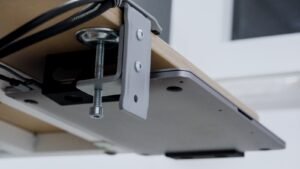
Fix: Switch to a reinforced or screw-mounted clip at that specific point rather than continuing to replace the same adhesive-only clip repeatedly.
Clip Discolors or Turns Brittle Over Time
Likely cause: Cheaper plastic clips exposed to direct sunlight or heat near a window can degrade faster than higher-quality silicone or reinforced plastic options.
Fix: Relocate clips in sun-exposed spots if possible, or switch to a silicone-based clip in that specific area, since silicone generally resists UV degradation better than basic plastic.
When to Replace Instead of Repair
If you’ve re-stuck a clip more than once in the same spot and it keeps failing, or you’re consistently needing a larger size than what you originally bought, it’s more efficient to switch to a different clip style or size than to keep patching the same setup. A properly sized clip for your actual cable load usually solves recurring failures for good.
Frequently Asked Questions
Why do my cable clips keep falling off?
Almost always an adhesion issue — the surface wasn’t cleaned before sticking, or firm pressure wasn’t held long enough after placement. Clean and re-stick with sustained pressure.
Can I remove a cable clip without damaging the wall or desk?
Removal can leave adhesive residue or minor marks — use isopropyl alcohol or an adhesive remover on any leftover residue rather than scraping it off.
Why does my cable keep slipping out of its clip?
Open-top clips rely on friction and can let a cable under tension pop back out — switch to a snap-close or fully enclosed clip for cables that move or flex regularly.
How do I know if I need a bigger clip?
If a clip holds the cable loosely or a bundle of several cables keeps slipping, size up to a larger clip or split the cables across two smaller clips instead of forcing them into one.
Do plastic cable clips degrade over time?
Cheaper plastic clips can discolor or become brittle with prolonged sun or heat exposure — silicone clips generally hold up better in sun-exposed spots than basic plastic ones.
Conclusion
Most cable clip problems come down to either skipped surface prep or a clip that’s simply the wrong size for the cable load it’s holding — both are quick fixes once you identify which one is actually happening.